Airbnb Welcome Book Template to Impress Guests (Mobile & Desktop)
A welcome book template is a reusable, pre-built guide — digital or printed — that you fill in once per property and hand to every guest. The point of using a template rather than writing one from scratch is consistency: the same sections, in the same order, every time, so nothing important gets forgotten on a rushed turnover day.
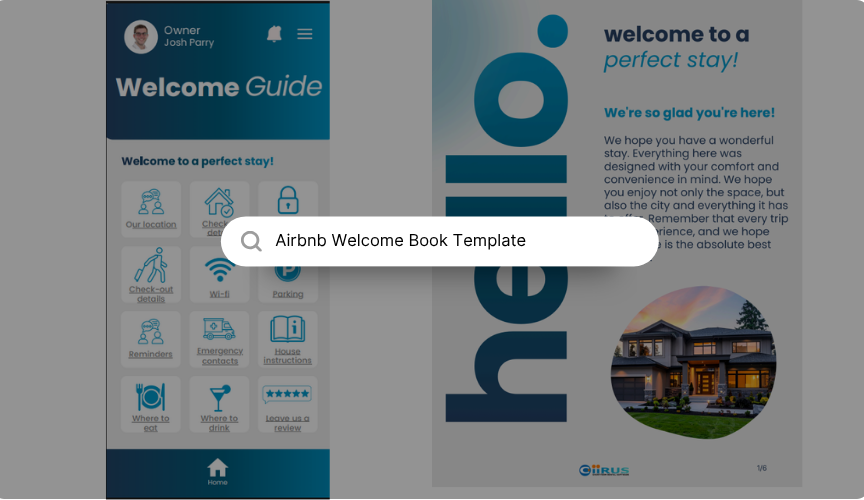
Most Airbnb welcome books get opened once, skimmed for ten seconds, and ignored for the rest of the stay. The ones that actually get used share a pattern: they're built from a consistent structure, they answer real questions in plain language, and they say something specific instead of something generic. This guide walks through that structure section by section, using real excerpts pulled from an actual welcome guide template as examples, so you can see exactly what "good" looks like rather than just a list of headings to fill in.
What an Airbnb welcome book template actually is
A welcome book template is a reusable, pre-built guide — digital or printed — that you fill in once per property and hand to every guest. The point of using a template rather than writing one from scratch is consistency: the same sections, in the same order, every time, so nothing important gets forgotten on a rushed turnover day.
A good one combines two very different kinds of information in a single place: the practical logistics a guest needs to get in and get settled (check-in, Wi-Fi, parking, house rules), and the local knowledge that makes the trip feel worth it (where to eat, what to do, what locals actually recommend). Most hosts are good at one half and skip the other. The templates that get read cover both.
None of this is Airbnb-specific, either. The same structure works whether the booking came through Airbnb, Vrbo, Booking.com, or your own direct-booking site. It's worth building it once as a single master document, then adjusting the branding or the delivery method per platform, rather than writing a new one from scratch every time you list somewhere else.
Welcome book, welcome letter, or house manual — what's the difference?
Hosts use these terms interchangeably, but they describe three different documents, and knowing the difference helps you decide how much to actually build.
A welcome letter is a single page — a warm greeting, maybe one thing to note, often printed and left on the counter. A house manual is narrower and more technical: rules and how-tos only, things like quiet hours, appliance instructions, and trash day, usually two to four pages. A welcome book is the umbrella document that includes the house manual, plus the greeting, the logistics, and a local guide — the full guest journey from booking to checkout, typically split across eight to fourteen short sections. A digital guidebook is simply a welcome book delivered as a link or an app screen instead of a PDF.
This guide is about the welcome book — the complete version — because it's the one that actually reduces the number of messages you get during a stay.
Why it's worth the effort
Airbnb scores every stay across six categories: cleanliness, accuracy, check-in, communication, location, and value. A well-built welcome book directly supports three of them. It supports accuracy, because it confirms the property matches what was described. It supports check-in, because it removes confusion about getting in the door. And it supports communication, because it answers a guest's question before they have to send it.
That last point matters more than it sounds. Short-term rental host analytics platforms have reported that listings which add clear, written checkout instructions see roughly a 5% drop in guest-reported issues within the following 90 days, and that each additional 5-star review is associated with a 3–5% lift in future bookings. A welcome book is one of the few things a host can build once, for free, that keeps paying off on every single turnover after that.
The sections every welcome book needs — with real examples
Below is the core structure, based on a real welcome guide template, with the actual sample copy included so you can see the tone and level of detail that works — not just a heading to fill in blind.
1. A welcome message that isn't boilerplate
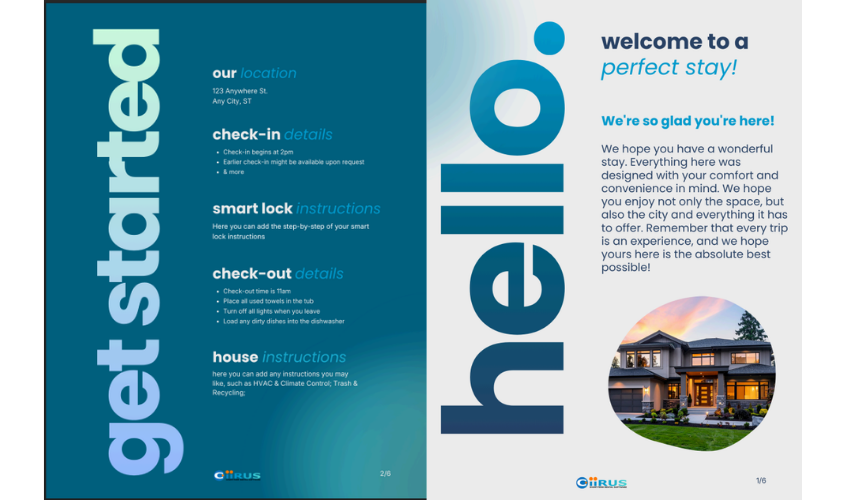
Every welcome book opens with a short greeting. It works best with a real photo of the property (not stock), the host's name, and a line that sounds like a person wrote it. Here's an example from a real template's opening screen:
"Welcome to a perfect stay! We're so glad you're here! We hope you have a wonderful stay. Everything here was designed with your comfort and convenience in mind. We hope you enjoy not only the space, but also the city and everything it has to offer."
It's simple, but it does its job: it sets a warm tone before the guest gets to the practical sections.
2. Location and directions
This section needs the full address, plus anything that fixes a known point of confusion — a wrong GPS pin, a driveway that looks like someone else's. A real template's "Our Location" section lays it out as a short highlights list plus numbered directions:
Highlights — Location: Napa Valley, California. Bedrooms: Two plus den. Bathrooms: Two. More: Hot tub, private garden, fully-finished kitchen.
Directions: 1. Take 104 East towards Anywhere Street. 2. Take a left on Anywhere St. 3. Drive about 3 miles down the windy road. 4. Use code 45 to get into the apartment.
Notice the directions are numbered steps, not a paragraph. That's the format guests actually follow while driving.
3. Check-in and access details
State the check-in time plainly, and always answer what happens if a guest arrives early — that's the question that generates the most last-minute messages. A real template keeps it to three short lines:
Check-in begins at 2pm. Earlier check-in might be available upon request. & more.
If access is through a smart lock or keypad, this is the one section worth over-explaining. Number every step ("1. Wake the pad. 2. Enter the code. 3. Press the checkmark."), because "enter the code" on its own is one of the most common causes of a late-night access text.
4. Wi-Fi
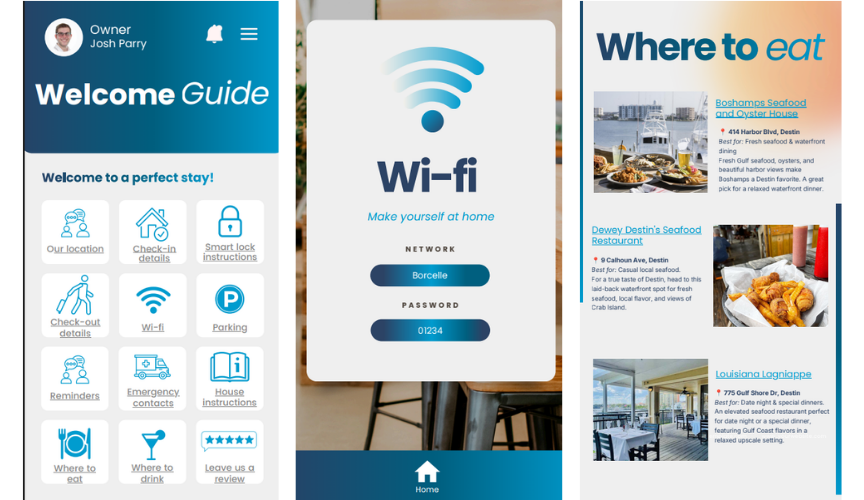
Guests look for this within the first minute of arriving. Format it so it's impossible to mistype — a template will typically lay it out as two labeled lines rather than a sentence:
Network: Borcelle
Password: 01234
If your real password mixes letters and numbers, avoid ambiguous characters like 0/O or 1/l — guests are often retyping it on a TV remote, not a keyboard.
5. Parking
Vague parking instructions cause outsized problems — a parking ticket on day one colors the entire stay, even if everything else goes perfectly. Say exactly where, and what to avoid:
Parking available. No parking on grass/lawns (protects irrigation sprinklers). No overnight street parking.
6. House rules and reminders
Keep this to four to six lines, stated once, clearly — not repeated across multiple sections. A real template's reminders section is a short, direct list:
No pets allowed. Quiet time after 11pm. No smoking inside. No parties or events.
Rules land better when they're framed as care for the space rather than a warning. "Quiet after 10pm — the walls carry sound to the neighbors" reads very differently from "quiet hours strictly enforced," even though it's the same rule.
7. Emergency contacts
Don't assume a guest knows the local emergency number, especially if they're traveling internationally. This section should never be buried — it needs to be as easy to find as check-in. A real template lists it plainly:
Emergency hotline: 911 (Police, Fire, Medical).
Florida Poison Control: Standard 1-800-222-1222 hotline.
Property manager contacts: Phone: 123.456.7890. Email: hello@reallygreatsite.com.
8. House instructions
This covers anything with a learning curve — HVAC and climate control, trash and recycling, appliances that aren't self-explanatory. Group instructions by room or by system rather than listing them all in one block, so the section reads like a quick reference instead of a manual.
9. Where to eat and what to do locally
This is the section that separates a generic template from one that feels personally curated — and it's the one most hosts do worst, usually because they drop in a link to Google Maps instead of an actual recommendation. Here's how a real template handles it, describing three restaurants with an address, what each is best for, and one sentence of real context:
Boshamps Seafood and Oyster House — 414 Harbor Blvd, Destin. Best for: Fresh seafood & waterfront dining. Fresh Gulf seafood, oysters, and beautiful harbor views make Boshamps a Destin favorite. A great pick for a relaxed waterfront dinner.
Dewey Destin's Seafood Restaurant — 9 Calhoun Ave, Destin. Best for: Casual local seafood. For a true taste of Destin, head to this laid-back waterfront spot for fresh seafood, local flavor, and views of Crab Island.
Louisiana Lagniappe — 775 Gulf Shore Dr, Destin. Best for: Date night & special dinners. An elevated seafood restaurant perfect for date night or a special dinner, featuring Gulf Coast flavors in a relaxed upscale setting.
Notice the pattern: name, address, one phrase on what it's best for, one sentence of real texture. That's a far more useful format than a bare list of restaurant names, and it takes barely longer to write.
10. Checkout details
Keep this to a short numbered list, and only ask for what you actually need — most guests don't need to strip beds or do a full clean. A real template's checkout section is four lines:
Check-out time is 11am. Place all used towels in the tub. Turn off all lights when you leave. Load any dirty dishes into the dishwasher.
Long checkout lists get skipped entirely. Short, numbered ones actually get followed.
11. The review ask
This belongs at the very end, sent as its own message after checkout — never bundled with checkout instructions, and never mentioned at check-in. A short, specific ask works better than a generic one: say plainly that a review matters for a small host, and keep it to one or two sentences.
Adjust it for who's actually staying
A fixed welcome book works for most guests, but a handful of swappable lines make it read as considerate rather than generic. For a family with kids, mention the nearest playground, whether the pool or stairs are gated, and where to find a highchair or travel crib if you have one. For a couple on a getaway, lean harder into the "where to drink" section and mention the quietest, most private spot on the property. For business travelers, the details that matter shift to Wi-Fi speed for calls, a workspace with good lighting, and the nearest coffee shop that opens early. For international guests, spell out the local emergency number explicitly rather than assuming they know it — 911 in the US, 999 in the UK, 112 across the EU — and note whether tipping is expected locally.
You don't need five separate welcome books for this. Keep the core structure fixed, and just swap two or three lines in based on who booked.
Digital, printed, or both?
Each format solves a different problem, which is why most well-run listings end up using two of the three. A digital version — sent as a PDF or a link before arrival — is the only format that can answer a guest's question before they've even left home, and it's the easiest to keep updated. A printed copy left in the unit is the backup for a dead signal zone, an older guest who prefers paper, or a dead phone battery. An app-based or hosted guide sits in between: it's live and instantly editable, which matters more the more properties you manage, but it still needs signal to load.
Digital also has two quieter advantages worth knowing about: it's the only format that can be translated for international guests without reprinting anything, and some hosting platforms will show you whether a guest actually opened the guide — useful if you're trying to figure out whether the questions you're still getting are a content problem or a discovery problem.
In practice, the combination that works best is simple: send the digital version in your pre-arrival message, while guests are still excited about the trip, and leave one printed copy on the counter as backup.
How to build yours in under an hour
You don't need design skills — you need the right order of operations.
Gather the raw facts first. Wi-Fi password, lock code, addresses, contacts, trash day. Write them in a plain note before touching design — this is most of the actual work.
Start from a template structure, not a blank page. Use the section list above as your skeleton. Drop a section only if it truly doesn't apply.
Write it like you'd text a friend. Short sentences, specific details — "the second spot in the driveway," not "parking available."
Add a few real photos, not stock images. The exterior from the street, the router, and the thermostat or lock if either is unusual.
Test it on your own phone, cold. If any step makes you pause, a guest will pause too — and message you instead.
Set a recheck reminder for every turnover. Passwords change, restaurants close, seasons shift. An outdated guide causes more confusion than no guide at all.
Test it before you send it
The fastest way to find the gaps in a welcome book is to stop reading it as the host and hand it to someone who's never been to the property — a friend, a neighbor, anyone unfamiliar. Ask them to find three things without any help from you: the Wi-Fi password, the checkout time, and what to do if they get locked out. If any of those takes longer than a few seconds to find, that section needs to move higher up, get shorter, or use bigger text.
Do this once before the first guest ever sees the guide, and again any time you add a new section. It catches the confusing parts that are invisible to you, because you already know all the answers — that's exactly why they're hard to spot on your own.
Wording matters more than design
The structure gives you the skeleton, but the wording is what actually changes how a guest feels reading it. A few side-by-side examples:
House rules. Weak: "No parties. No smoking. No pets. Quiet hours enforced. Violators will be charged." Better: "Keep it to registered guests and quiet after 10pm — the walls carry sound next door. Thanks for looking after the place!"
Arrival instructions. Weak: "Use the code to enter. Address is on your reservation." Better: "123 Anywhere St. — GPS sometimes routes to the wrong drive; look for the blue mailbox. Code is 4521, tap the pad first to wake it up."
Local recommendations. Weak: "Lots of good restaurants nearby, check Google Maps." Better: "Boshamps, 8 minutes away — sit on the harbor side and order the oysters. Go before 6pm on weekends or you'll wait."
Same information in every pair. Only one version sounds like it was written by someone who's actually stayed there.
Mistakes that quietly undo a good welcome book
Sending it too late. If it arrives at check-in, it missed the questions guests already asked before leaving home.
One giant wall of text. No section breaks, no headings — guests skim the first line and give up on the rest.
Leaving it stale. An old Wi-Fi password or a closed restaurant does more damage than never mentioning either.
Burying the emergency information. It shouldn't require scrolling past ten other sections to find the one that matters most.
Copying a generic template word-for-word. Guests can tell. Specifics build trust that generic phrasing can't.
Asking for a review at check-in. It reads as presumptuous before the stay's even happened — save the ask for after checkout.
Keep it a living document, not a one-time project
A welcome book decays quietly if nobody owns it. Check it after every turnover for anything that changed — a new router, a broken appliance, a restaurant that closed — and do a full read-through twice a year, once before your busy season and once after, to refresh seasonal notes like AC filters, snow removal, or pool opening dates.
If you work with a cleaner or a co-host, the same document is worth keeping accurate for their sake too, not just the guest's. A cleaner who knows exactly where the fuse box is or which bin goes out on which day doesn't need to text you either — the guide becomes shared operational knowledge, not just a guest-facing extra.
Frequently asked questions
What should an Airbnb welcome book template include?
At minimum: a warm welcome message, directions and check-in steps, Wi-Fi and access details, parking information, house rules, emergency contacts, appliance and utility instructions, checkout steps, and a short list of nearby food and things to do. The best templates also leave a natural spot to ask for a review after checkout.
Is a welcome book required by Airbnb?
No, Airbnb doesn't require one. But it directly supports three of the six categories guests rate you on — accuracy, check-in, and communication — which makes it one of the highest-leverage things a host can add for free.
How do I make a free Airbnb welcome book?
Start from a template rather than a blank page. Fill in the sections above, design it in a free tool like Canva or Google Docs, export it as a PDF, and share it by link or QR code before arrival.
Should my welcome book be digital or printed?
Send a digital version before and during the stay so guests always have it on their phone, and leave one printed copy in the unit as backup for guests who lose signal or prefer paper.
How long should an Airbnb welcome book be?
Long enough to answer every real question, short enough that no section takes more than a few seconds to scan. Most well-built guides run eight to fourteen sections — one topic per page or screen — rather than one long wall of text.
What's the difference between a welcome book and a house manual?
A house manual covers policies and how-tos only — quiet hours, appliance instructions, trash day. A welcome book is broader: it includes the house manual plus the greeting, local recommendations, and everything else a guest needs for the whole stay.
How often should I update my welcome book?
At every turnover for anything broken or changed, plus a full review twice a year for seasonal details and local recommendations that may have closed. See "Keep it a living document" above for the full routine.